 FileMagicHub Team
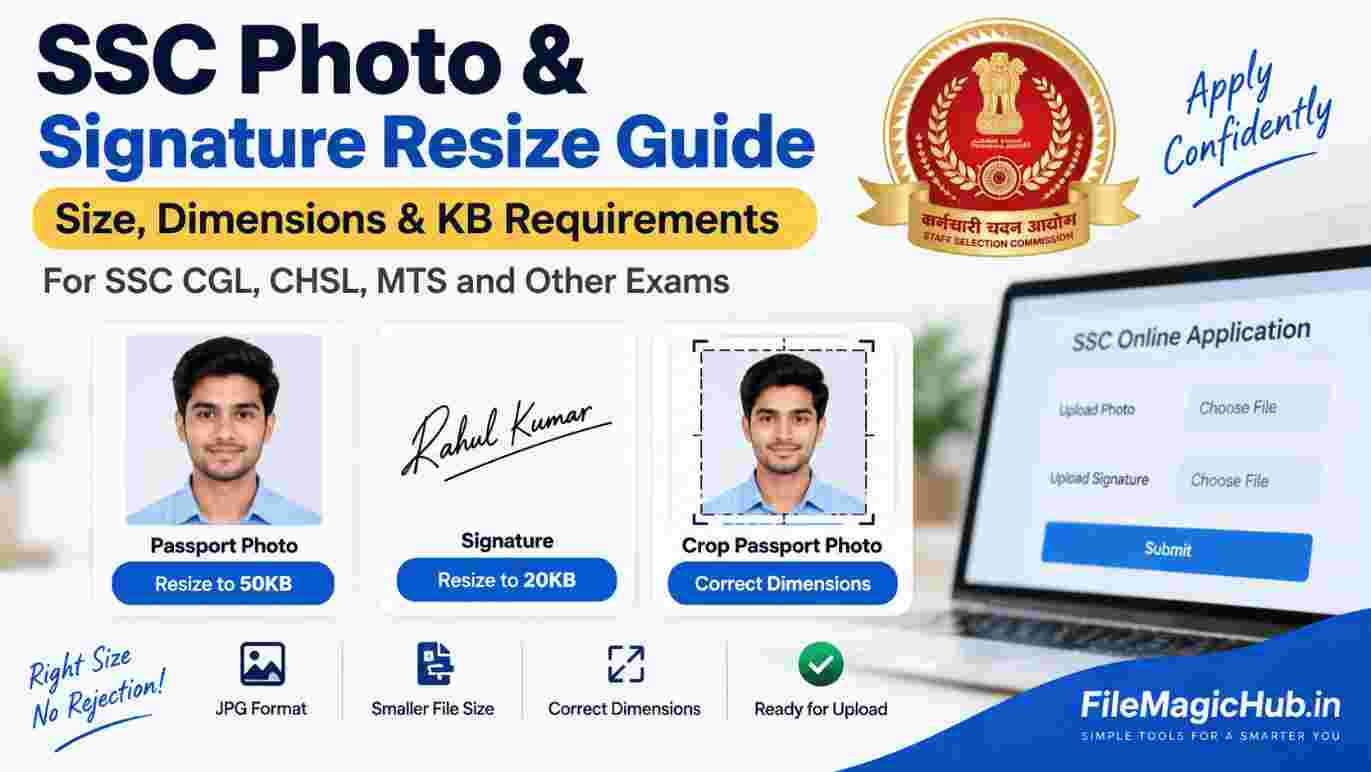
SSC Photo & Signature Resize: Size, Dimensions & KB Guide
Learn how to resize SSC photos and signatures to the required KB and dimensions for CGL, CHSL, MTS and other government exams.
Applying for an SSC exam online is usually straightforward, but uploading the photograph and signature can sometimes be confusing. The SSC application form may require your image files to meet specific file size, dimensions, format, and other requirements.
If your photo is too large, your signature exceeds the permitted KB limit, or the image dimensions are incorrect, the application portal may reject the file.
In this guide, you will learn how to resize an SSC photo, reduce a signature to the required KB size, crop a passport-size photo, and prepare your images for SSC CGL, CHSL, MTS, and other government exam applications.
Important: SSC photo and signature requirements can change between examinations and recruitment cycles. Always check the latest official SSC notification and application instructions before uploading your files.
SSC Photo and Signature Requirements
The exact photo and signature requirements depend on the particular SSC examination and its current notification. Therefore, always verify the latest instructions before submitting your application.
Depending on the examination, you may need to meet requirements related to:
Requirement | What to Check |
|---|---|
Photo format | Check the format specified in the latest notification |
Signature format | Check the format specified in the latest notification |
Photo file size | Follow the permitted KB range |
Signature file size | Follow the permitted KB range |
Photo dimensions | Follow the specified width and height |
Signature dimensions | Follow the specified width and height |
Background | Follow the current photo guidelines |
Photo quality | Use a clear and recent photograph |
Signature | Make sure the signature is clearly visible |
Do not rely on an old SSC notification, as image specifications may be updated for a new recruitment cycle.
How to Resize SSC Photo to 50KB
If your SSC application requires a photograph within a particular file-size range, you may need to resize or compress your image before uploading it.
You can use our free online tool:
[Resize Photo to 50KB → /photo-resizer-50kb]
Step 1: Select your photograph
Choose a clear and recent photograph from your phone or computer. JPG or JPEG is commonly used for online application forms, but always check the format specified by your current SSC application.
Step 2: Upload the image
Open the Photo Resizer and upload your photograph.
Step 3: Set the required file size
Enter the required maximum file size, such as 50KB, if that is what your current SSC application instructions specify.
Step 4: Resize and compress
The tool will reduce the image dimensions and/or file size according to the selected settings.
Step 5: Download the resized photo
Download the final image and check its file size and dimensions before uploading it to the SSC application form.
Tip
Do not compress the image excessively if the resulting photograph becomes blurry or difficult to recognize. Try to maintain good image quality while staying within the required file-size limit.
How to Resize SSC Signature to 20KB
A signature image is generally smaller than a photograph, but a scanned signature can still exceed the permitted file size.
If your application requires a signature around 20KB, you can use:
[Resize Signature to 20KB → /signature-resize-20kb]
Follow these steps:
Sign on a clean white sheet of paper.
Scan or take a clear photograph of the signature.
Crop unnecessary white space around the signature.
Upload the image to the signature resize tool.
Set the required file size according to your SSC notification.
Compress the image.
Download the final signature file.
Check the file size and dimensions before uploading.
The signature should remain clear and readable after compression.
What If Your Photo Has the Wrong Dimensions?
Reducing the file size alone may not solve the problem.
For example, you may have a photograph that is only 40KB but has dimensions that do not match the requirements of the application form.
In that situation, you need to crop or resize the image dimensions first and then compress it to the required file size.
You can use our:
[Crop Passport Size Photo → /crop-passport-photo]
This can be useful when you need to crop a regular photograph into a passport-style format.
How to Prepare a Photo for SSC Online Application
Follow this process before uploading your photograph:
1. Start with a clear photograph
Use a recent photograph in which your face is clearly visible.
2. Check the background
Use the type of background specified by the current SSC application instructions.
3. Crop the photograph
Remove unnecessary areas around the subject while keeping the face properly positioned.
4. Set the required dimensions
Check the latest SSC application instructions and set the image dimensions accordingly.
5. Reduce the file size
If the image is too large, compress it to the permitted KB range.
6. Check the final image
Before uploading, verify:
File format
File size
Image dimensions
Image quality
Face visibility
Background
Any other requirement mentioned in the notification
How to Prepare an SSC Signature Image
Preparing the signature correctly is also important.
Recommended process:
Sign → Scan/Photograph → Crop → Resize → Compress → Check → Upload
Make sure the signature is:
Clearly visible
Not cut off
Not rotated
Not excessively compressed
On a suitable background
Within the file-size and dimension limits specified by SSC
Avoid uploading a very dark, blurry, or pixelated signature.
SSC Photo Resize vs. Compress: What's the Difference?
These two terms are often used interchangeably, but they are slightly different.
Image Resize
Resizing changes the dimensions of an image.
For example:
1200 × 1600 pixels → 600 × 800 pixels
Image Compression
Compression reduces the file size of an image.
For example:
500KB → 100KB
Sometimes you need to do both.
For an SSC application, the process may therefore be:
Crop → Resize Dimensions → Compress File Size → Check → Upload
Can I Resize an SSC Photo on My Mobile?
Yes. You can prepare your SSC photograph directly from a smartphone.
The easiest approach is:
Take or select a clear photograph.
Crop it properly.
Open an online image resizing or compression tool.
Upload the photograph.
Enter the required file size or dimensions.
Download the processed image.
Check the final file before uploading it.
This is particularly useful when you are completing the SSC application from your mobile phone.
How to Check Photo File Size on Your Phone
Before uploading, check the file information on your device.
On most smartphones, you can open the image details or properties to see its file size and dimensions.
For example, you may see:
Format: JPG
File Size: 48KB
Dimensions: 200 × 230 pixels
Compare these details with the requirements shown on the SSC application page.
SSC CGL, CHSL and MTS Photo Requirements
SSC conducts several examinations, including:
SSC CGL
SSC CHSL
SSC MTS
SSC GD
SSC CPO
SSC JE
SSC Stenographer
The image requirements can differ between examinations and recruitment cycles.
Therefore, do not assume that a photo accepted for one SSC examination will automatically meet the requirements of another examination.
Always check the latest notification and application instructions for your specific exam.
Quick SSC Photo & Signature Checklist
Before submitting your application, use this checklist.
Photograph
Recent photograph
Face clearly visible
Suitable background
Correct image format
Correct dimensions
Correct file size
Image is not blurry
Image is not excessively compressed
Signature
Signature is clearly visible
Correct image format
Correct dimensions
Correct file size
Signature is not cropped incorrectly
Image is not blurry
File opens correctly
Frequently Asked Questions
What size should an SSC photo be?
The required photo file size and dimensions depend on the particular SSC examination and its latest notification. Always check the current application instructions before preparing your photograph.
How can I resize my SSC photo to 50KB?
Upload your photograph to a photo resizing or compression tool and set the required file-size limit. You can use our Photo Resizer to reduce the image size before uploading it.
How can I resize my SSC signature to 20KB?
First crop your signature properly and then compress the image to the required file size. You can use our Signature Resize Tool for this.
Can I resize an SSC photo without losing quality?
Some quality loss can occur when an image is compressed. Starting with a clear, high-quality image and reducing the dimensions and file size gradually can help maintain better quality.
Can I use a mobile phone to resize my SSC photo?
Yes. You can use an online photo resizing tool from a smartphone without installing additional software.
What format should an SSC photo be?
The required format depends on the current SSC application instructions. JPG/JPEG is commonly used for image uploads, but you should always confirm the format specified for your particular examination.
Why is my SSC photo rejected even though it is under 50KB?
A file being under 50KB does not necessarily mean it meets all requirements. The application may also check dimensions, format, image quality, background, or other specifications.
Can I use the same photo for SSC CGL and CHSL?
You can use the same photograph only if it satisfies the requirements of both applications and is otherwise appropriate for the respective application. Check the latest requirements for each examination before uploading.
Resize Your SSC Photo & Signature Online
Preparing images for a government exam application does not have to be complicated.
If your photograph or signature is too large, you can resize and compress it online before submitting your application.
Useful FileMagicHub Tools
📷 [Resize Photo to 50KB → /photo-resizer-50kb]
Reduce your photograph to a specific file-size limit.
✍️ [Resize Signature to 20KB → /signature-resize-20kb]
Prepare your signature for online application forms.
🖼️ [Crop Passport Size Photo → /crop-passport-photo]
Crop your photograph into a passport-style format before resizing it.
Final reminder: SSC application requirements can change. Always compare your final photo and signature with the requirements mentioned in the latest official notification before submitting your application.
Conclusion
Getting your SSC photo and signature ready is mainly about following the correct dimensions, file format, and file-size requirements.
Whether you are applying for SSC CGL, CHSL, MTS, or another government examination, first check the latest official instructions. Then crop, resize, and compress your image accordingly.
With the right tools, you can prepare your photo and signature from your mobile or computer without installing any software.
If your image is too large, use FileMagicHub's online tools to resize, compress, and crop your files before uploading them to your SSC application.
FileMagicHub Team
Expert team at FileMagicHub, dedicated to providing the best file management tools and productivity tips. We help millions of users streamline their digital workflows.